
Get started
Prerequisities
To begin using GS1 Sweden APIs, you must first become a customer. The specific APIs available to you
will depend on the type of agreement established. Additional details can be found in the referenced
documentation. Within the Developer Portal, you can browse the available APIs and review their
associated endpoints.
Starting in July 2026, GS1 Sweden will utilize the Azure API Management gateway, and version-managed
endpoints must be used. Customers who are already integrated with GS1 Sweden APIs will be required
to update their endpoints during 2027.
Base URLs and scopes
Integrating applications must use the appropriate base URL corresponding to the target environment.
For version-managed endpoints, the standard “Request” URL should be used. Customers with existing
integrations may continue to use the “Request for integration” URL provided for the original endpoints.
Version-managed endpoints
Production: https://api.gs1.se
Pre-prod: https://api-preprod.gs1.se
Production: https://services.validoo.se
Pre-prod: https://services-preprod.validoo.se
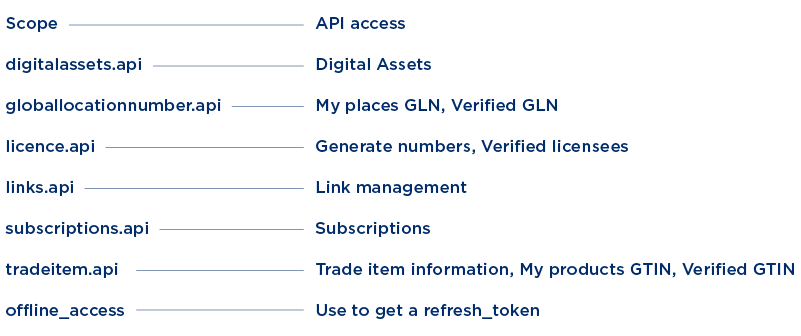
APIs and related scope to use.
API limitations
There is no predefined limit on the number of API calls permitted per day. However, GS1 Sweden reserves the right to introduce usage limits at any time without prior notice and to restrict API calls at its sole discretion. Clients are therefore encouraged to bundle requests where possible and distribute them over time to minimize load.
Additionally, any information retrieved from GS1 Sweden services must be stored locally. Such data must not be consumed directly by end-user applications without appropriate intermediate handling or persistence.
Authentication
GS1 Sweden APIs use OAuth token-based authentication. Clients must request an access token by providing the credentials (username and password) of a designated API user. If the credentials are valid, an access token is issued.
Support for refresh tokens is also provided. The structure of the token request and response is described in the referenced documentation.
Tokens
Request token
The client requests an access token via the designated token endpoint. Access tokens are time-limited, and the token response includes an expires_in property indicating the validity period in seconds. The request must specify the relevant scopes corresponding to the intended usage. Following the initial request, a new access token should only be requested when the current token is nearing expiration; alternatively, refresh tokens should be used to obtain a new access token.
Refresh token
A refresh token is obtained by making a request to the same token endpoint used for acquiring an access token. The request must include the refresh_token value previously issued in the initial token response. If the request is valid, a new access token and refresh token will be issued. Note that the offline_access scope must have been included in the initial token request for a refresh token to be returned.
Using the token
The application must include the retrieved access token as a Bearer token in the Authorization header when making requests to any public GS1 Sweden API.
Token endpoints
Token endpoints for both pre-production and production environments are available on the Technical Integration page, accessible to logged-in users within MyGS1.
Implementation
Once all prerequisites have been met, an implementation example is available in the referenced documentation.